Salesforce admins
Before
Hours lost on sharing-rule archaeology every week.
After
Triage access tickets in minutes, with an audit trail attached.

AgentForceAccess traces role hierarchy, sharing rules, manual shares, teams and territories — then explains the answer in plain English. Hours of debugging become a single question.
 ISV Partner · works across your Salesforce clouds
 Sharing in Salesforce is the product of six different mechanisms stacked on top of OWD. Tracing the real reason a user has access takes the average admin 30–90 minutes per case — if they get there at all.
Inherited access from a manager three layers up.
Criteria-based and ownership-based rules across orgs.
One-off grants that no one remembers giving.
Implicit shares from related Account membership.
Enterprise Territory Management on Accounts/Opps.
Custom share rows written by triggers or code.
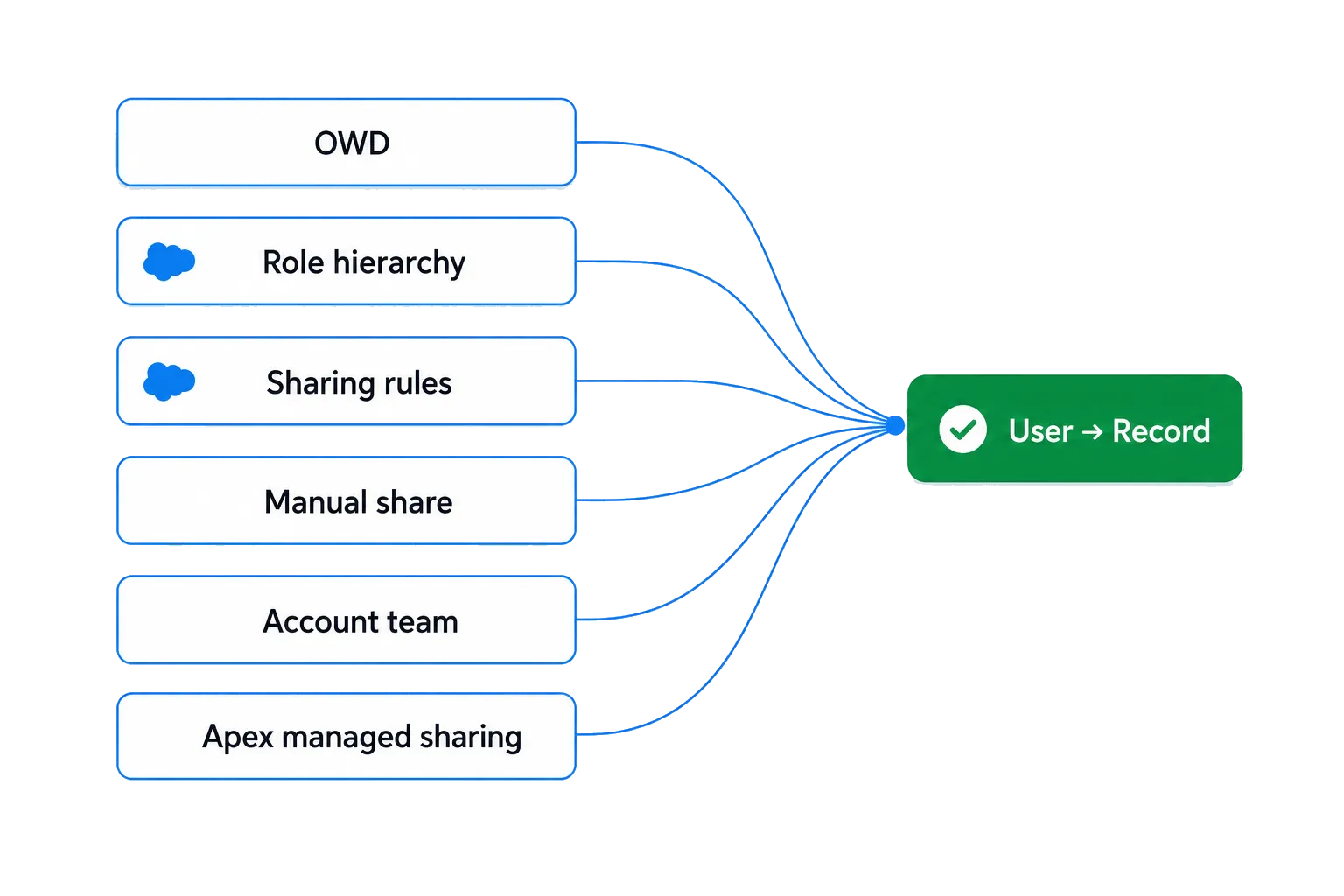
Six independent share mechanisms — one explanation.
OAuth into Salesforce with a read-only Connected App. We never write metadata or records — and we don't copy your data out.
"Why can Nina edit OPP-1042?" — or paste a record ID and a user. No SOQL, no permissions UI archaeology.
The agent walks every share path: OWD → role → groups → manual share → team → territory → Apex. It explains in English and shows the trace.
Save the transcript as PDF or push it to Jira/ServiceNow. Every claim links to the metadata source it was derived from.
Ask in English. Or Polish. Or German. The agent translates intent into the exact metadata lookups it needs.
OWD, role hierarchy, public groups, sharing rules, manual shares, account teams, opportunity teams, territories, Apex sharing — all in one trace.
A least-privilege Connected App. AgentForceAccess can only describe — it can never alter permissions or data.
Every explanation is signed, timestamped and exportable. Hand it to your auditor or paste it straight into a ticket.
Drop in a list of users or records. Get a side-by-side comparison of who has access to what — and why.
Get notified when an unusual share path appears — like a manual share on a sensitive object or an Apex grant from a new trigger.
Track unusual share grants over time, spot drift between sandbox and production, and surface the records with the most explicit access exceptions — all in one view.
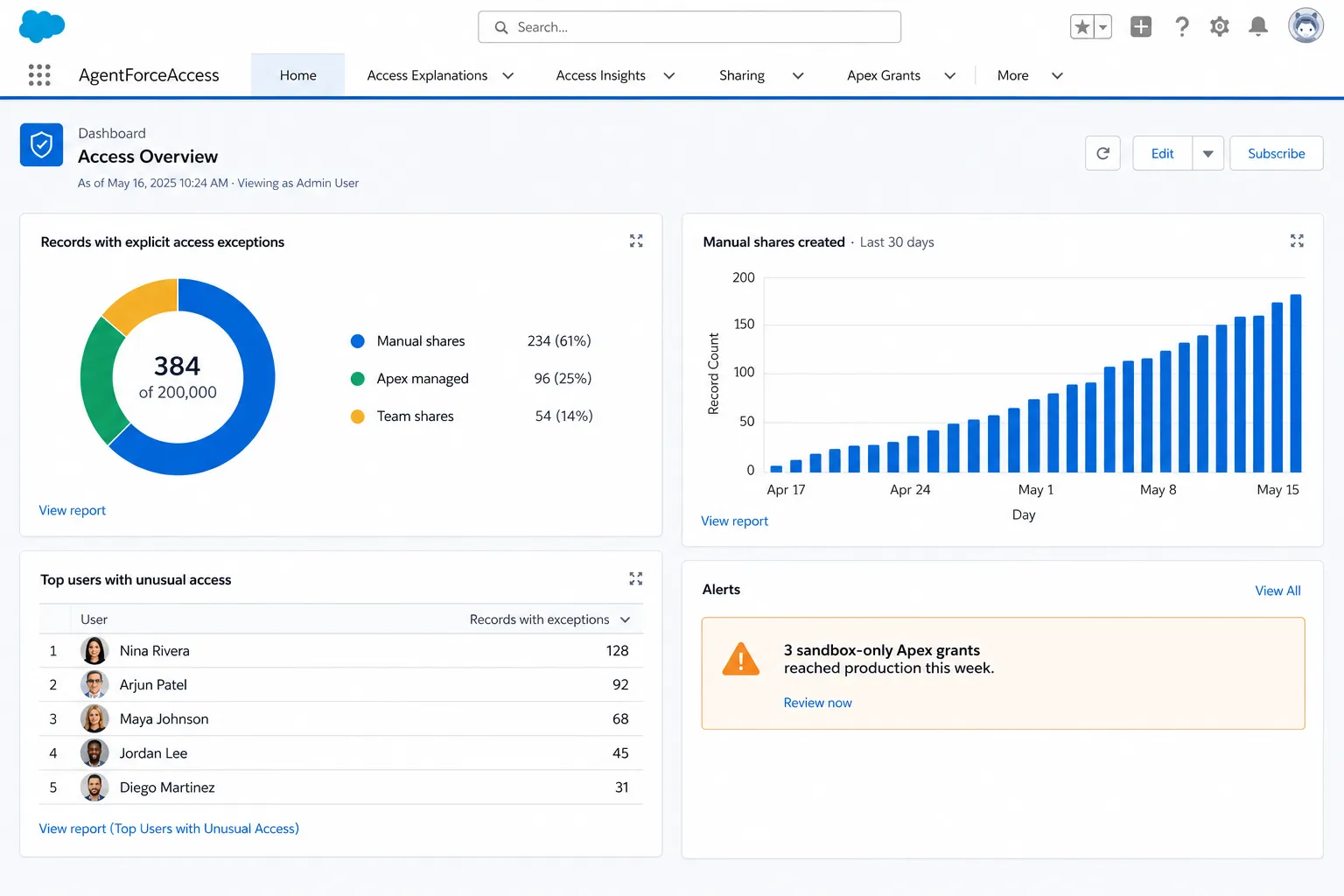
OAuth into your org with least-privilege scopes. We can describe, never write.
Record bodies stay in your VPC peering region. Only minimal metadata leaves to answer your question.
Target: Q3 2026. Annual penetration testing today; full report available under NDA.
Pick the region your org runs in. GDPR DPA available on request.
Hours lost on sharing-rule archaeology every week.
Triage access tickets in minutes, with an audit trail attached.
Cannot prove who can see what across a 500k-record org.
Run bulk reviews for SOX / GDPR / HIPAA evidence on demand.
"Why does this AE see another rep's pipeline?" tickets pile up.
Self-serve answers — instantly explainable to managers.
Early-access pricing. We're collecting feedback before we set the meter — your input here goes straight into the model.
For solo admins testing the water.
For working Salesforce teams.
For RegTech-grade orgs.
Prices are indicative for the smoke-test phase. No card required during early access — you'll only be billed if we mutually decide the product is worth shipping to you.
No. AgentForceAccess is an independent product built on top of the public Salesforce APIs. We are not affiliated with, endorsed by, or sponsored by Salesforce, Inc.
Only the metadata and the specific record(s) you ask about. Connection is through a read-only OAuth Connected App. We never bulk-export your data, and we never write back to your org.
On a frontier LLM hosted in a SOC-2 environment. Your record data is sent only when you ask a question, and is never used to train models.
Org-wide defaults, role hierarchy, public groups, criteria-based and ownership-based sharing rules, manual shares, account/opportunity/case teams, Enterprise Territory Management, and Apex managed sharing.
Yes — sandbox is the recommended starting point during early access. Production connection is opt-in per org.
The native button tells you the user can access the record. AgentForceAccess tells you why — across every share mechanism, in plain language, with a citation to the metadata that grants it.
Join the onboarding queue. We're letting a handful of orgs in each week — priority for teams with 1k+ Salesforce users.
Point us at your sandbox and we'll send you a 10-page PDF in 48h: who can see what they shouldn't, which share paths are exotic, and three low-risk cleanups you can ship this sprint.