
How file sharing works on records (ContentDocumentLink)
The data model behind Salesforce Files: ContentDocument, ContentVersion and ContentDocumentLink — and how ShareType and Visibility decide who can see a file.
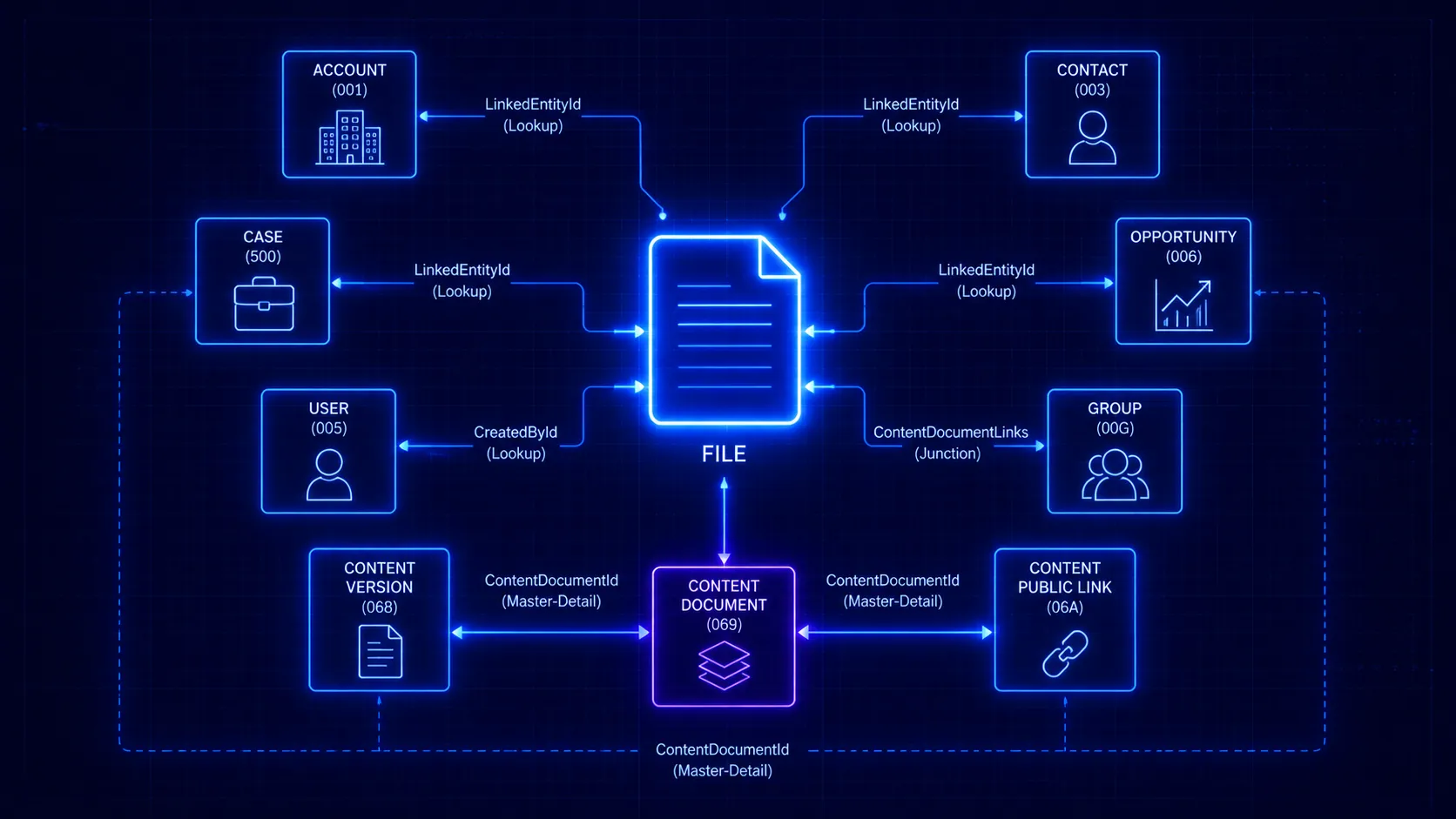
If you’ve ever wondered why a file shows up where it does in Salesforce — or had to query files in Apex or a report — you need the data model underneath. Modern Salesforce Files are three related objects, and two fields on the link decide who sees what. This is the admin/developer companion to who can see a file in Salesforce.
The three objects
| Object | What it is | How many |
|---|---|---|
| ContentDocument | The file itself | One per file |
| ContentVersion | A specific version of the file’s content | One per upload/revision |
| ContentDocumentLink | A link joining the file to a record, user or group | Many per file |
When you upload a file you create a ContentVersion, which Salesforce wraps in a ContentDocument. When you attach that file to a record or share it with someone, you create a ContentDocumentLink.
The file is the ContentDocument. Where it lives and who can see it is entirely in its ContentDocumentLinks.
ContentDocumentLink: the field that matters most
A ContentDocumentLink row says “this file is linked to that thing, at this access level, for this audience.” Its key fields:
LinkedEntityId — what the file is attached to
The ID of whatever the file is linked to:
- A record (Account, Opportunity, Case, custom object…) → the file is “attached to” that record.
- A User or Group → the file is shared directly with that person or group.
A single file can have many links at once — attached to two records and shared with one user simultaneously. Each link is an independent path to seeing the file.
ShareType — the access level
| Value | Level | Can do |
|---|---|---|
V | Viewer | Open and download |
C | Collaborator | View, edit, upload new versions, change sharing |
I | Inferred | Access level inherited from access to the linked record |
Inferred (I) is the important one for record-attached files: a user’s access to the file is derived from their access to the record it’s linked to. That’s the mechanism behind “anyone who can see the record can see its files.”
Visibility — which audience
| Value | Audience |
|---|---|
AllUsers | Internal and external (community) users |
InternalUsers | Internal users only |
SharedUsers | Only users the file is explicitly shared with |
This field is the one that quietly breaks Experience Cloud access: a record-attached file with Visibility = InternalUsers won’t show to community users even though they can see the record. (More on that in files and guest / Experience Cloud users.)
How access actually resolves
Putting it together, a user can see a file if any of its ContentDocumentLinks grants it:
- A link to a record they can access (ShareType
I) — access inherited from the record’s sharing. - A link directly to them or their group (ShareType
V/C). - A library membership, or a public link (separate mechanisms).
…and the link’s Visibility must include their audience. Most “file not visible” tickets come down to a missing link or a too-narrow Visibility.
Querying it
Because it’s all data, you can inspect it directly — e.g. find every place a file is shared:
SELECT ContentDocumentId, LinkedEntityId, ShareType, Visibility
FROM ContentDocumentLink
WHERE ContentDocumentId = '069...'
Each row is one audience that can reach the file. To enumerate the people, you then expand each LinkedEntityId record’s full sharing audience — which is where it gets large fast.
From rows to a plain-English answer
A file attached to several records inherits each record’s entire audience — role hierarchy, sharing rules, teams and all — multiplied across every ContentDocumentLink. Reconstructing that by hand from raw rows is exactly the work that hides accidental exposure. AgentForceAccess walks the ContentDocumentLinks and the record sharing behind each one, and answers “who can see this file, and why” in plain English.
Frequently asked questions
What is the difference between ContentDocument, ContentVersion and ContentDocumentLink?
ContentDocument is the file itself (one per file). ContentVersion is a specific version of that file (one per upload/revision). ContentDocumentLink joins a ContentDocument to something else — a record, user or group — and carries the access level and visibility for that link.
What does LinkedEntityId point to?
It is the ID of whatever the file is linked to. For a file attached to a record it is the record ID (Account, Opportunity, Case, etc.); for a file shared directly with a person or group it is a User or Group ID. A single file can have many ContentDocumentLinks at once.
What are the ShareType values V, C and I?
V = Viewer (open and download), C = Collaborator (view, edit, upload versions, change sharing), I = Inferred (the access level a user gets indirectly from access to the linked record). Inferred is how record access propagates to a file.
What does the Visibility field do?
Visibility sets who the link is exposed to: AllUsers (internal and external/community users), InternalUsers (internal only), or SharedUsers (only users the file is explicitly shared with). Community/Experience Cloud users typically need AllUsers to see a record-attached file.
See it on your own org
AgentForceAccess explains, in plain English, why any user can see any record or file — across every Salesforce sharing mechanism.
Request early access